

Table of contents

How to get your API key in Linear (5 steps)



Jon Gitlin
Linear provides a powerful ticketing and project management platform for product teams.
And while Linear already provides the features and functionality product teams need to manage their workflows out-of-the-box, the platform offers even more value when it’s connected to the other applications they and their clients use.
To help you build to Linear, we’ll break down the first step you need to take: accessing your unique API key.
{{this-blog-only-cta}}
1. Create an account or login
To get started, you’ll either need to login to your existing account or sign up for one.

2. Visit your workspace settings
From your homepage, navigate to your username on the top-left corner and click “Workspace settings.”

Related: 5 steps for creating and using your GitLab access token
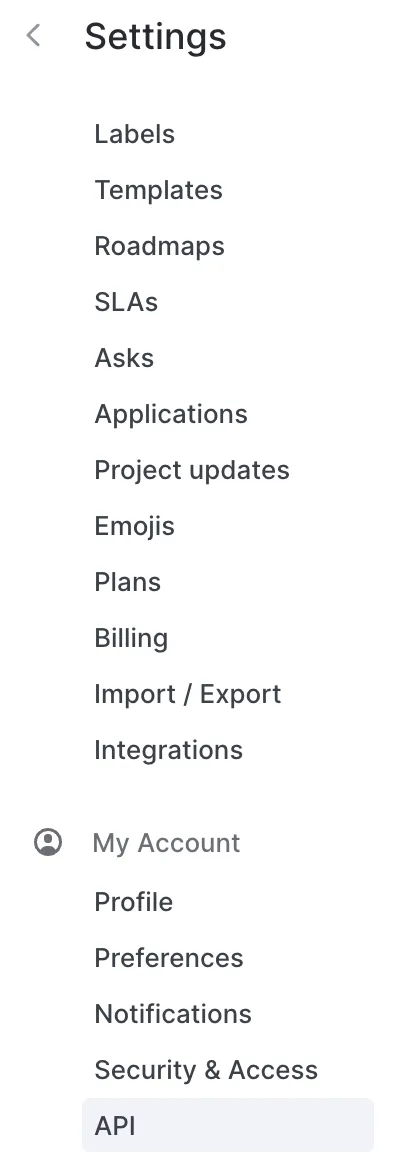
3. Click on “API”
Within the narrow “Settings” column on the left-hand side, scroll down until you see “API." Go ahead and click it.
Related: A guide ticket APIs
4. Select “Create new API key”
You should now see a label field alongside a button that allows you to generate an API key. You can add a label for the key and then select “Create new API key.”

5. Store the key in a secure location
You should now see your API key! Since Linear won’t display it again, make sure you copy and add it to a secure place.
Other key considerations for building to Linear’s API
Before deciding whether to build to Linear’s API, it’s worth familiarizing yourself with the following:
Pricing
Linear offers 3 self-serve plans (“Free”, “Standard”, “Plus”), in addition to “Linear Enterprise.”

As you move up these plans, you’ll be able to access unlimited issues, more advanced security features (e.g., admin roles), and more responsive customer support.
Read more about Linear’s pricing.
Rate limits
Linear offers different rate limits for different authentication methods. For instance, if you use an API key to authenticate your requests, you can make 1,500 requests per hour; and if your request doesn’t use an authentication method, you’re limited to 60 requests per hour.

Linear also communicates key insights on rate limits in its response headers. This includes the number of requests you can still make in the current rate limit window and when the rate limit window is slated to reset.
Learn more about Linear’s rate limits.
Errors
As you make requests to Linear’s API, you’ll likely see a variety of HTTP status code errors. Here are just a few you can expect:
- 400 Bad Request, which highlights that the request couldn’t be processed due to an issue on the client’s side
- 404 Not Found, which can either mean that the resource doesn’t exist or that the endpoint wasn’t formatted correctly
- 429 Too Many Requests, which signifies that you’ve made too many requests within the given rate limit window and need to wait until the next window starts
- 503 Service Unavailable, which means that the server can’t handle requests at the moment
Final thoughts
Linear is a powerful ticketing and project management solution, but your clients are likely to use several others, such as Asana, Wrike, or Jira.
To help you integrate your product with all the ticketing solutions your clients use, you can build to Merge’s Ticketing Unified API.
Learn more about the unified API, and Merge’s platform more broadly, by scheduling a demo with one of our integration experts!
Jon Gitlin
.png)
.png)

Add 30+ ticketing integrations via Merge
Simply build to Merge's Unified API to integrate Linear—and dozens of other ticketing applications—with your product.


But Merge isn’t just a Unified
API product. Merge is an integration platform to also manage customer integrations. gradient text
But Merge isn’t just a Unified
API product. Merge is an integration platform to also manage customer integrations. gradient text
But Merge isn’t just a Unified
API product. Merge is an integration platform to also manage customer integrations. gradient text
But Merge isn’t just a Unified
API product. Merge is an integration platform to also manage customer integrations. gradient text