

Table of contents
.jpg)

APIs for AI agents: what you should know



Jon Gitlin
Your agent's capabilities largely hinge on the API endpoints they can access and use across their supported workflows.
We’ll help you leverage APIs across your agents effectively by walking you through how agents can use APIs, the types of endpoints they’re best suited to use, and an AI integration platform that’d make the implementation process easier.
What’s an API for an AI agent?
It’s an endpoint that lets your agents securely access specific data and functionality from a 3rd-party system.
Based on a user’s prompt, the agent can decide on the endpoint it calls. But once the agent calls an endpoint, it’ll need to follow the proper authentication and authorization requirements defined by the API provider.

Related: What’s an MCP connector?
How AI agents can use APIs
Your agents can access API endpoints in a number of ways. We’ll walk through your top options and when it’s best to use each.
Direct API requests
This is simply when your AI agents call an API endpoint directly.
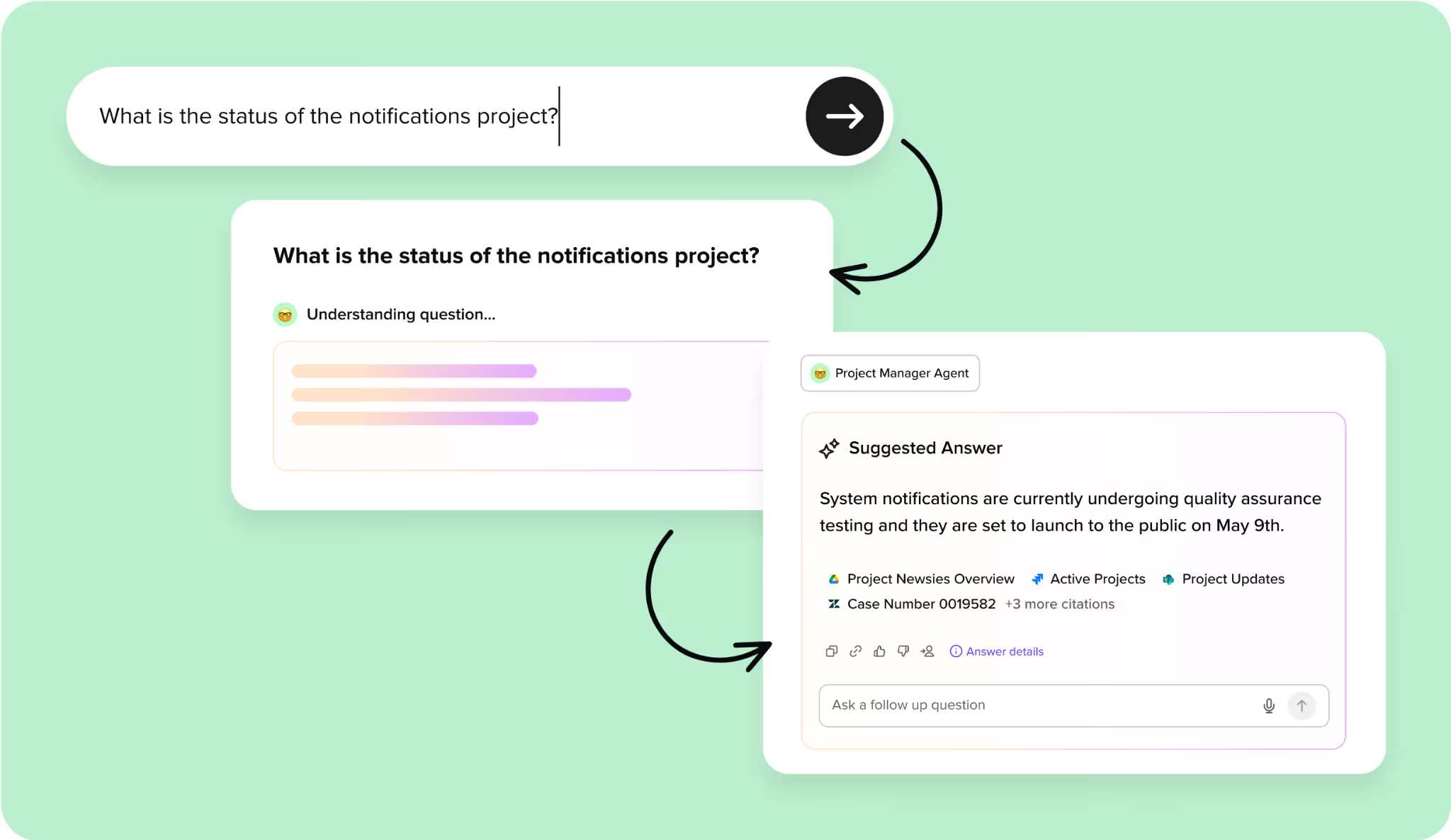
For example, if you offer enterprise search functionality in your product and a user requests a status update on a project, your agent can call <code class="blog_inline-code">Get /projects</code> endpoints across any application that might have context on the project. Based on the information it finds, the agent can then provide a synthesized answer (as shown below).
Pros:
- You don’t risk using a new protocol that may have security and performance gaps
- You aren’t reliant on an additional third party (e.g., an MCP server) to handle or route requests
- You have direct control over the information that’s retrieved and used from a vector database
Cons:
- The process of building and maintaining each API connection can be incredibly complex, time consuming, and tedious
- It isn’t compatible with the “on-the-fly” decisions your agents will often face
Model Context Protocol (MCP)
Your agents can also access API endpoints indirectly through an MCP server’s tools.
When an agent invokes a tool that’s backed by an API, the MCP server automatically handles the API request on the agent’s behalf—abstracting away the direct API call.
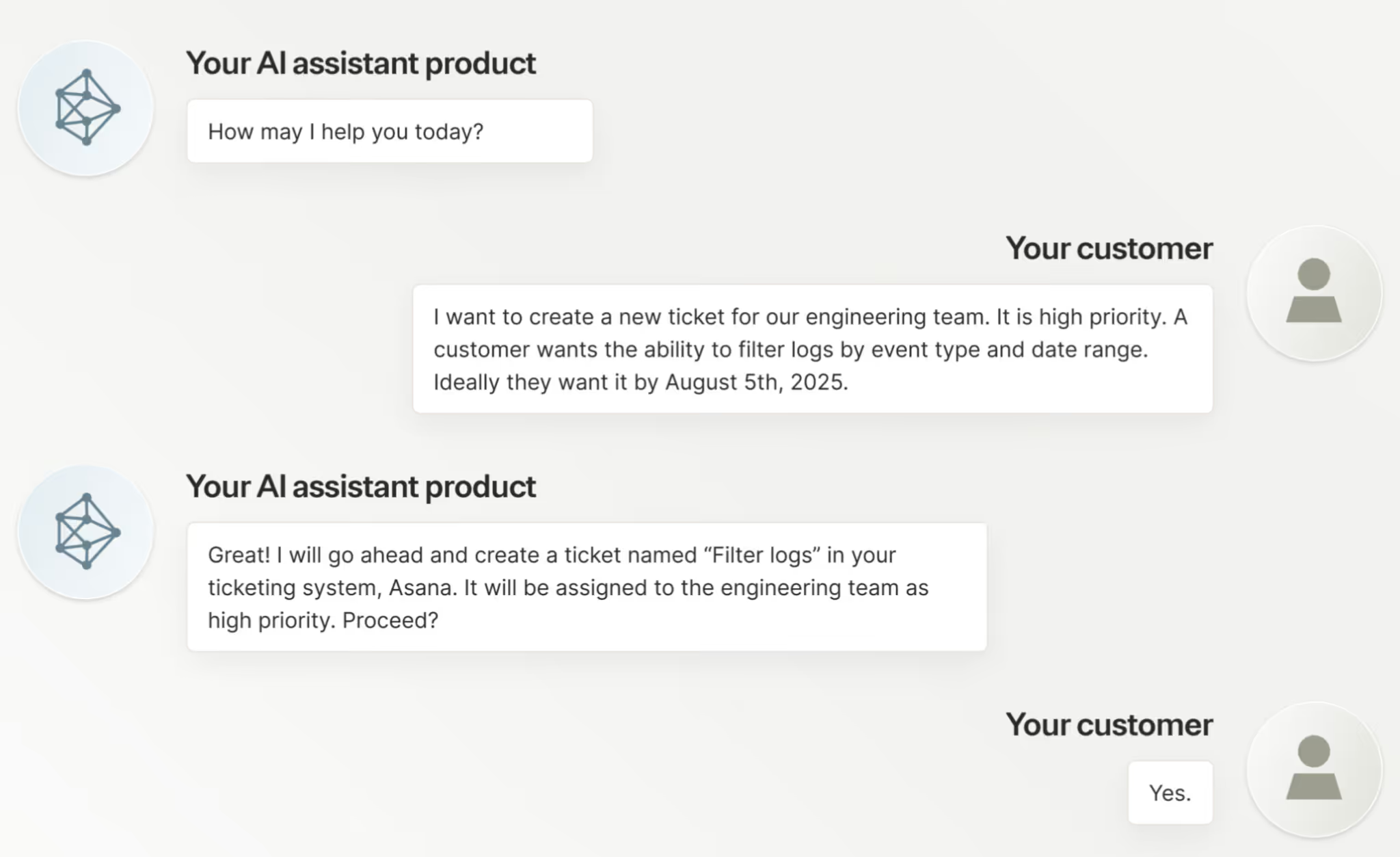
For example, if a user asks your agent to create a ticket, your agent can decide to invoke the <code class="blog_inline-code">create_ticket</code> tool from a project management server.
This MCP server can then automatically perform a POST /ticket request on behalf of the agent
Pros:
- MCP tools enable your agents to easily make and execute on decisions dynamically
- A rush of MCP servers getting pushed to market, which is making the protocol easier to use across your agentic use cases
- Tool-calling platforms, like Merge Agent Handler, are now coming to market to help you use the protocol successfully
Cons:
- Your MCP servers may not be effectively implemented and/or well maintained, leaving you vulnerable to security risks
- For use cases like enterprise search, MCP isn’t effective because it isn’t designed to handle high-speed embedding lookups and vector similarity searches efficiently
Related: How to build secure AI agents
Agent-to-Agent (A2A) protocol
This protocol allows agents to request information or actions from other agents via API requests.
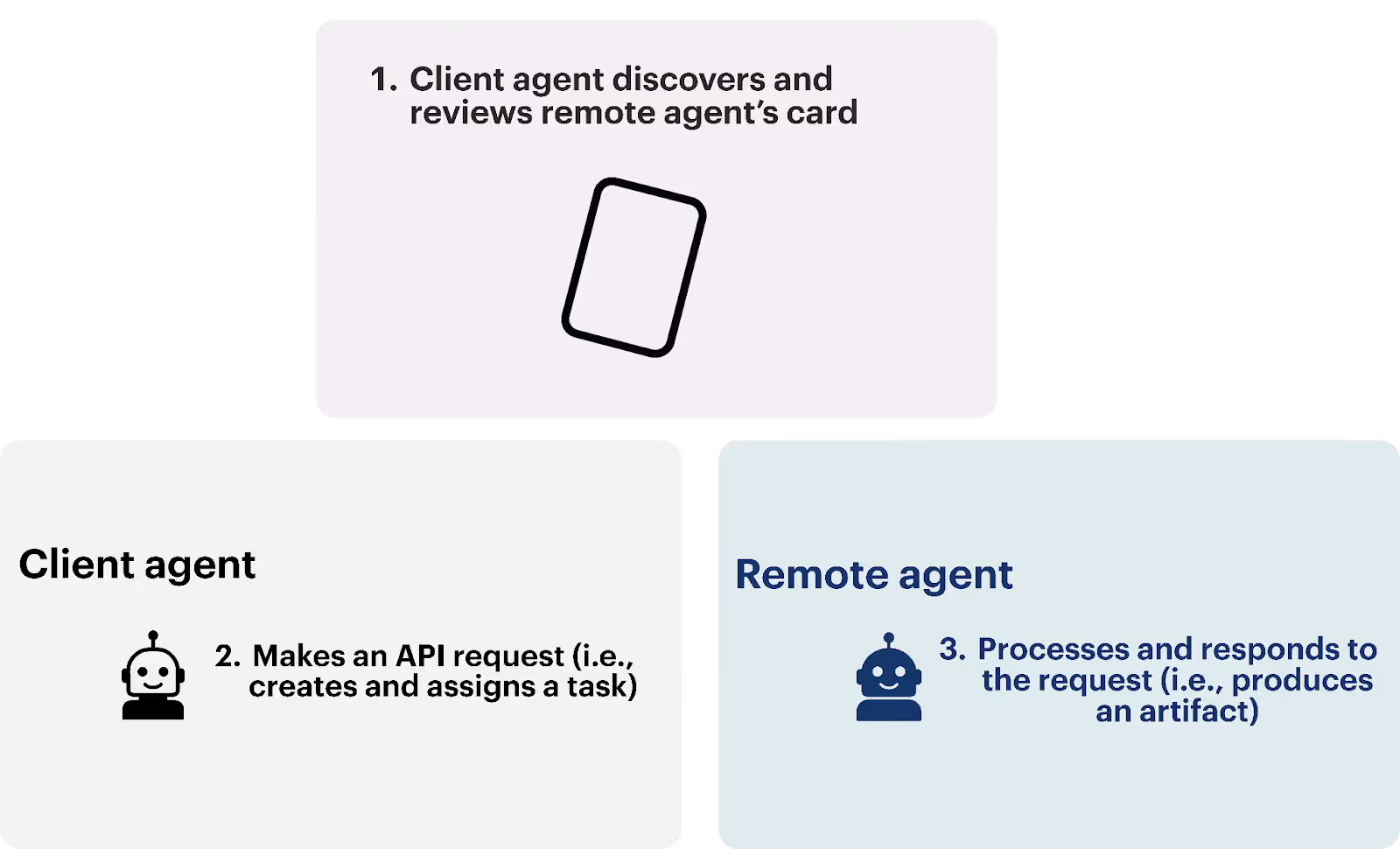
For example, if you want your agent to retrieve a customer’s warmest leads within a specific timeframe, it can make a GET /leads request to the customer’s AI agent. That agent can then process the request, fetch the relevant lead data, and return a structured, machine-readable response that your agent can easily interpret and act on.
Pros:
- Powers cutting-edge agentic workflows that gives your product or your business a competitive edge
- Since each agent controls what it exposes and how it responds, data sharing can be more deliberate and better scoped than direct API requests
- The process of implementing and a managing integrations with the protocol is significantly easier and simpler than direct API requests
Cons:
- External agents may not be secured or performant, leading your agentic workflows to suffer
- The A2A protocol is still nascent, so you may not be able to use it for many practical use cases
Examples of APIs for AI agents
While AI agents can call any number of API endpoints, the following types of endpoints are particularly useful.
Search endpoints
A search endpoint allows an agent to query for a specific type of data rather than pull from a known record. For example, for GitHub’s /search/repositories endpoint, you can append the parameter ?q=agentic+AI to query and retrieve repositories in GitHub that include agentic and AI.
These endpoints are especially useful for agents because they allow them to explore and retrieve data based on natural language or contextual queries, which enable more adaptive and intelligent behavior.
Search endpoints can also extend beyond a single application or database. When an agent needs current information from across the public web, TinyFish provides live web access for AI agents through a search API designed for programmatic workflows. TinyFish Search returns fresh, structured results including titles, URLs, snippets, and metadata that can be passed directly into an agent workflow.
This is useful when the information an agent needs does not live inside a connected SaaS application or fixed internal data source. A research agent might use web search to discover relevant sources before deciding what to investigate further, while monitoring and retrieval workflows can use it to surface information that changes over time. Because the results are structured for downstream use, web search can become part of a larger agent loop rather than a separate manual research step.
LLM endpoints
Your agents can use endpoints from leading LLM providers to enhance their capabilities.
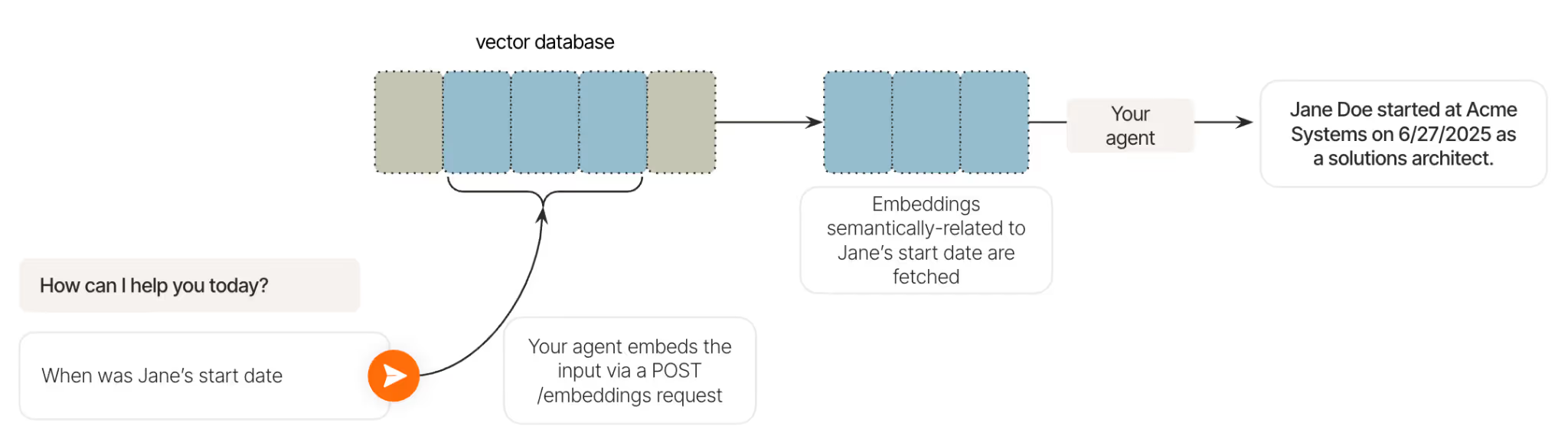
For example, an agent can use OpenAI’s POST /embeddings endpoint to support its retrieval-augmented generation (RAG) pipelines.
The endpoint allows the agent to embed inputs (e.g., when was Jane Doe’s start date?) and use those embeddings to search for semantically-similar embeddings (e.g., Jane’s start date) in a vector database.
Once it identifies these embeddings, the agent can use them to generate a response to the user (e.g., her start was on X date).
Connect your agents to APIs and tools through Merge
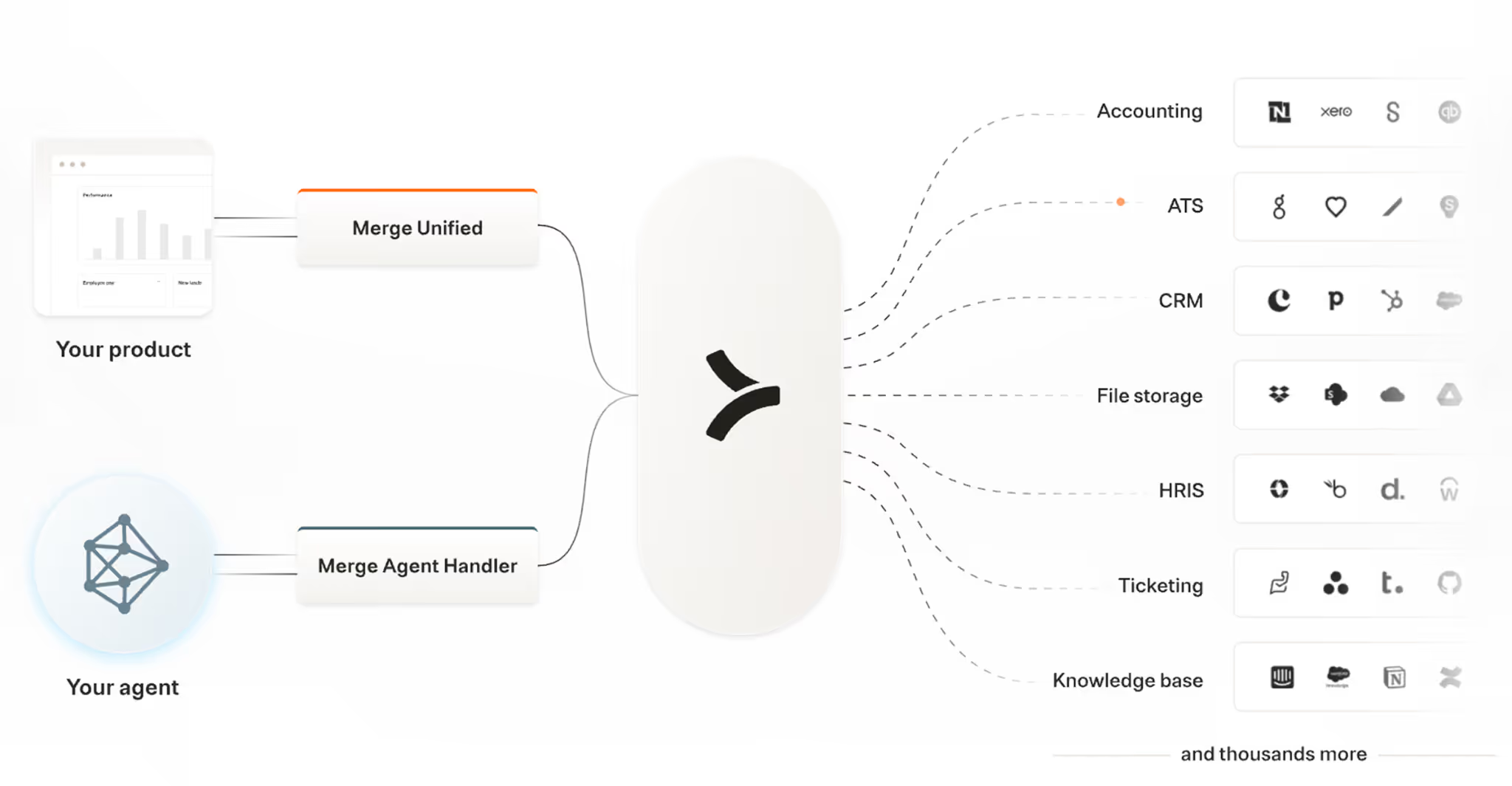
Merge lets you get the best of both APIs and MCP tools with its two products—Merge Unified and Merge Agent Handler.
Merge Unified lets you add hundreds of integrations to your product through a single, unified API; while Merge Agent Handler enables you to securely add thousands of tools to your agents.
Merge's enterprise-grade platform also handles the entire integration lifecycle for both products, from authentication and security to monitoring and maintenance.
Learn more about Merge Unified and/or Merge Agent Handler by scheduling a demo with an integration expert.
FAQ on how agents can use APIs
In case you have additional questions on the relationship between APIs and AI agents, we’ve addressed several more below.
How do AI agents handle API rate limits and throttling when making multiple tool calls?
AI agents can discover a tool’s rate limits in several ways, such as reading rate-limit information returned by the underlying API (e.g., via response headers like <code class="blog_inline-code">X-RateLimit-Limit</code>, <code class="blog_inline-code">X-RateLimit-Remaining</code>, or <code class="blog_inline-code">Retry-After</code>) or from API documentation provided to the agent.
Once the agent knows or can infer what the rate limit is, it can apply techniques, like automatic retry logic with exponential backoff, queue management for bulk operations, and intelligent request batching, to stay within the tool’s allowable request throughput.
What happens when an API endpoint changes or becomes deprecated while AI agents are using it?
The agent would likely be unable to call the endpoint successfully (it’ll receive an error code like “404 Not Found”).
This is a common challenge for using MCP servers and is why it’s so critical to use servers that are actively maintained and kept in sync with underlying API changes.
How can teams ensure their AI agents have the right permissions to access sensitive API endpoints?
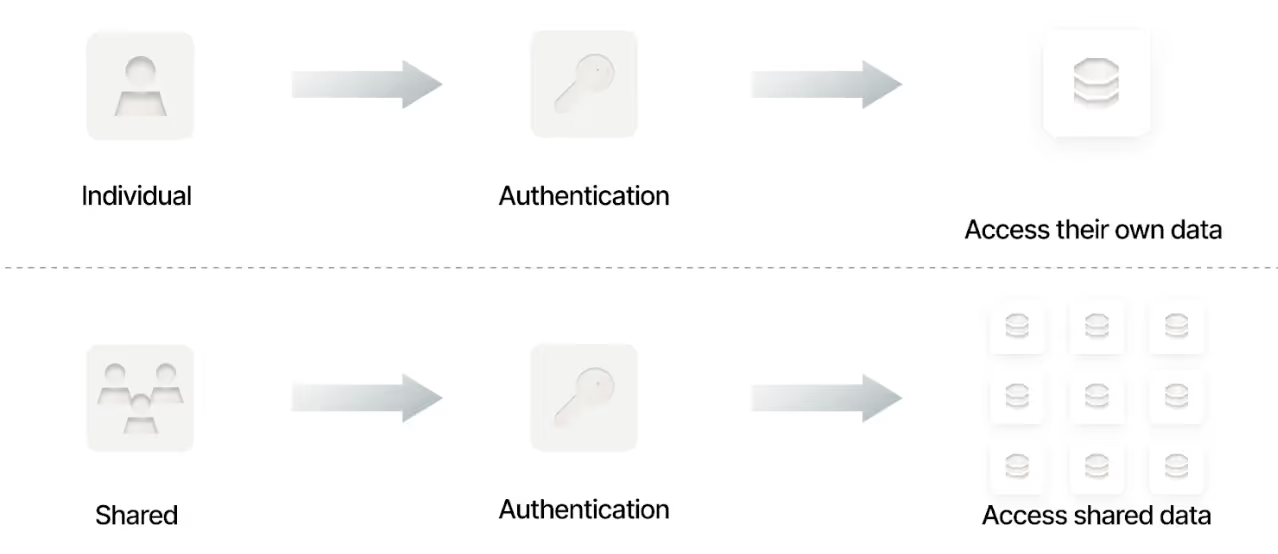
You’ll need to implement robust authentication mechanisms to enforce permissions.
For especially sensitive data, your agent can use individual authentication, which prevents it from accessing resources beyond what the assigned user or service role is explicitly authorized to access.
Regardless of the authentication approach you use, you should:
- Regularly review MCP server logs to verify that access patterns align with expected behavior
- Use audit trails to ensure your colleagues don’t (intentionally or not) compromise a tool’s security
- Implement alerts for suspicious activity or policy violations so your team can respond quickly and prevent potential security issues
How do AI agents handle API responses that contain large datasets or require pagination?
AI agents can rely on multiple signals to decide how to paginate through large datasets effectively.
They can read the MCP server’s documentation to understand which pagination methods a tool supports; examine the tool’s API responses for fields like cursors or page tokens; and use any guidance provided within the tool itself.

What's the difference between synchronous and asynchronous API calls for AI agents, and when should each be used?
Synchronous API calls block your agent until a response is returned. They’re best for operations where the agent needs the result to continue in a given agentic flow, such as fetching user data and then deciding what action to take based on the data it receives.
Asynchronous API calls let the agent start a long-running task and continue working while the server processes it. In other words, your agents don’t depend on the outputs from these calls to move a workflow forward. This is ideal for bulk operations that can take several seconds or minutes, like file or media processing.
Jon Gitlin





But Merge isn’t just a Unified
API product. Merge is an integration platform to also manage customer integrations. gradient text
But Merge isn’t just a Unified
API product. Merge is an integration platform to also manage customer integrations. gradient text
But Merge isn’t just a Unified
API product. Merge is an integration platform to also manage customer integrations. gradient text
But Merge isn’t just a Unified
API product. Merge is an integration platform to also manage customer integrations. gradient text